
Pensora Pro · Web reports
Your comparison.
Ready to keep.
Export your scenarios, yearly figures and sources in one PDF.
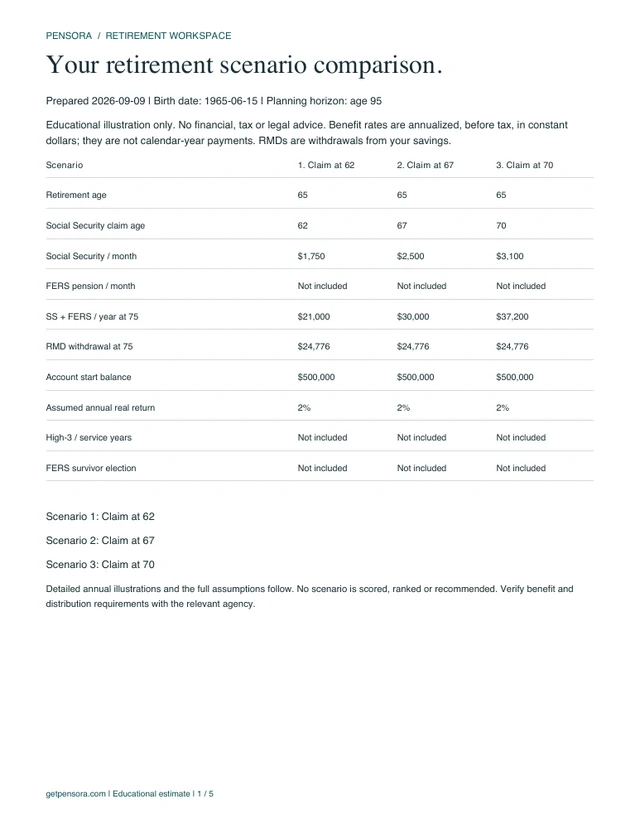
Inside your report.
- Your scenarios side by side
- Year-by-year figures
- Assumptions and primary sources
Secure checkout with Polar. Activate your license after purchase. Final amount and terms appear before payment.
Both plans cover the current web report features. iPhone purchases are separate.
Still comparing? Your workspace, local saves and backup stay free. Open my workspace →
Already purchased Pro?
Find your license key in your Polar customer portal, then activate reports on this browser. Your planning inputs stay on your device.
Open Polar customer portal ↗Before you choose.
Do I need a Pensora account?
No. The workspace saves in your browser. Pro uses a Polar-issued license for reports; restore access on another browser with that key. Your scenarios move only when you export and import a backup.
Does this include the iPhone app or spouse planning?
This web offer covers the features listed above. iPhone purchases are separate. Spouse, survivor Social Security and household modeling are future work and are not included in this report tool.
Will Pro tell me when to retire?
No. Reports illustrate the assumptions you choose. Pensora does not give personalized financial advice, assess retirement readiness or recommend one scenario.
Where do my numbers go?
Calculations, local saves and PDF generation run in your browser. Only the license key is sent to Pensora and Polar to verify access. We do not send your retirement inputs with it.
How do cancellation and refunds work?
Annual web purchases renew until canceled through the Polar customer portal. Lifetime is a one-time payment for the current report features. See refunds and support. The final amount and billing terms are shown before payment.